HubSpot DevTools: Free Chrome Extension for Developers
Working with HubSpot CMS can be a great experience for developers, but there are a few repetitive tasks that quickly become part of the daily workflow.
If you regularly build themes, templates, or modules, you probably find yourself constantly modifying URLs to enable development features like cache refresh, developer mode, or debugging tools.
After doing this countless times, I decided to simplify the process.
So I built HubSpot DevTools, a lightweight Chrome extension designed to give developers quick access to these tools with a single click.
The Problem: Repetitive URL Parameters
When developing on HubSpot CMS, testing changes often requires enabling specific query parameters.
For example:
- Bypassing cache to see template updates
- Enabling developer mode while building modules
- Activating debugging tools to troubleshoot issues
In practice, this means repeatedly adding parameters such as:
?hsCacheBuster - ?hsDebug - ?hsDebugOnly
While this works, it slows down development and interrupts your workflow.
Developers end up manually editing URLs or bookmarking multiple variations of the same page just to test changes properly.
The Solution: HubSpot DevTools
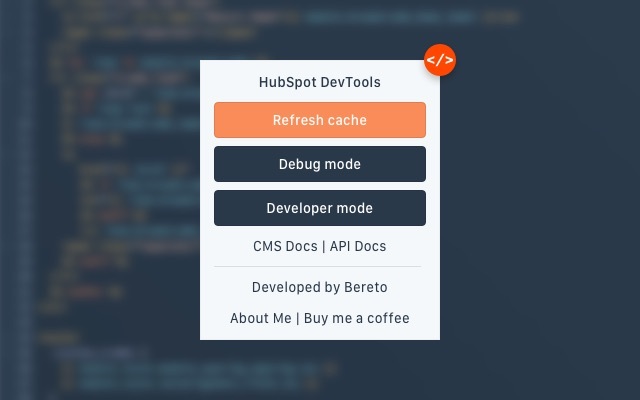
HubSpot DevTools is a simple Chrome extension that makes these features instantly accessible.
Instead of modifying URLs manually, you can enable development parameters directly from your browser with one click.
The goal is simple: reduce friction and speed up your development workflow.
Features
- Refresh Cache
HubSpot caching is helpful in production but can slow down development when you need to see changes immediately.
The extension allows you to reload pages while bypassing the cache so your updates appear instantly.
-
Developer Mode
When working with templates or custom modules, developer mode is often necessary.
HubSpot DevTools lets you enable developer mode quickly without manually adding parameters to the URL.
-
Debug Mode
Debugging templates or HubL output sometimes requires enabling HubSpot’s debugging tools.
The extension provides quick access to debug mode so you can troubleshoot issues more efficiently.
Faster Development Workflow
The main purpose of the extension is to remove repetitive tasks from your workflow.
Instead of constantly editing URLs, you can toggle development features instantly while testing your pages.
Who Is This Extension For?
HubSpot DevTools is designed for:
- HubSpot CMS developers
- Theme developers
- Frontend developers working with HubSpot templates
- Technical marketers managing HubSpot websites
- Agencies building or maintaining HubSpot CMS projects
If you regularly develop on HubSpot CMS, this tool can save time and make your workflow smoother.
Install the Extension
HubSpot DevTools is completely free and available on the Chrome Web Store.
You can install it here: https://chromewebstore.google.com/detail/hubspot-devtools/hhifglmiiaaaoofhngnadmnldakijadf
Feedback and Feature Ideas
This is the first version of the extension, and I plan to continue improving it.
If you work with HubSpot CMS and have ideas for new features or improvements, I would love to hear your feedback.
HubSpot DevTools started as a small personal tool to remove friction from everyday development tasks. Now it’s available for the broader developer community working with HubSpot CMS.
If you’re building sites, themes, or modules in HubSpot, give it a try and let me know what you think.